AIProductSep 2025 – ongoing
Resuzen — Job-Search Toolkit
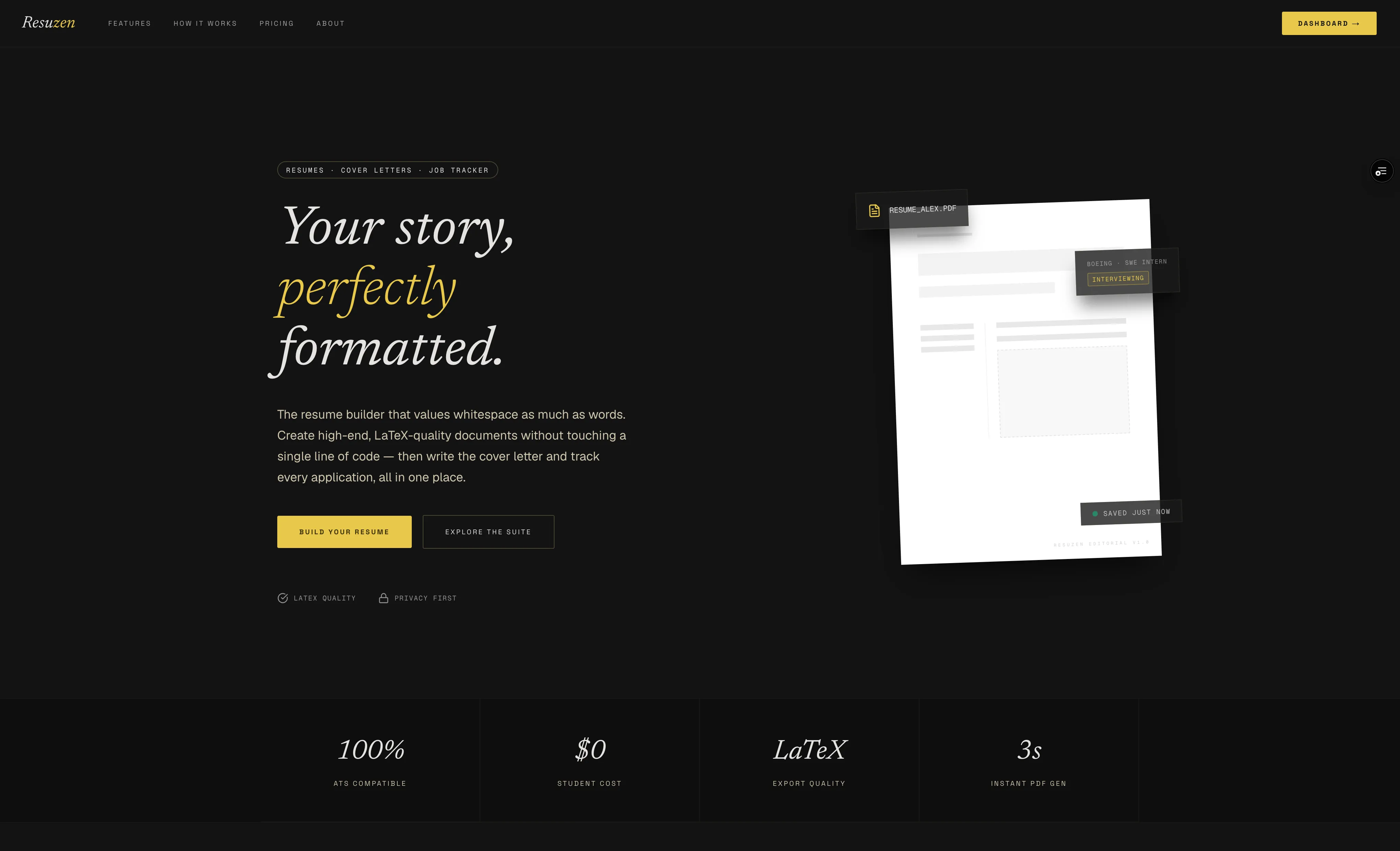
A LaTeX resume builder with a job-search toolkit around it: application tracking, cover letters and interview prep, each tracked application linked to the exact resume sent.
Next.js · React · JavaScript · Tailwind CSS · Supabase · Stripe · OpenRouter · LaTeX · PostHog · Sentry · Vercel
- What it is
- A LaTeX résumé builder wrapped in a full job-search toolkit — tracker, cover letters, AI interview prep — where every tracked application links back to the exact résumé version you sent.
- Hardest problem
- Compiling LaTeX with no LaTeX on the server. Hosted providers are flaky and return HTML error pages, so compilation falls back across providers inside a wall-clock budget and validates PDF magic bytes — a broken compile fails loudly instead of masquerading as a résumé.
- What I'd change
- A real admin UI for approving submitted reviews; it is still closer to a manual database flag than I’d like.
- Tests
- 344
- Resumes Generated
- 100+
- Resume Templates
- 8
The Problem
Most resume builders stop at the resume. You craft a document, export a PDF, and then you're on your own — juggling a spreadsheet of where you applied, guessing which version of your resume you actually sent to which company, and starting from scratch every time you need to tailor bullets or write a cover letter. The tools that do offer AI tend to hide everything behind a paywall or, worse, quietly invent experience you don't have.
Resuzen solves the whole job-search loop, not just the document. It's a guided, LaTeX-powered resume editor that produces genuinely ATS-friendly PDFs, wrapped in a job-application tracker, a cover-letter studio, an AI writing suite, and — most recently — an AI interview-prep workspace. The connective tissue is a feature competitors can't easily copy: every application you track links back to the exact resume version you submitted, so tailoring, prep, and follow-up all stay grounded in what you actually sent.
The audience has broadened over the project's life. It started as a student- and new-grad-focused resume builder, but the tracker, tailoring, and interview-prep features now serve any active job seeker running multiple applications. The pricing philosophy reflects that reach: everything with zero marginal cost stays free and unlimited (the tracker, PDF downloads), while only real-cost features (AI generations, the Pro templates, higher resume limits) sit behind a modest Pro tier.
My Approach
The resume builder is deliberately guided rather than freeform. Content is organized into eight structured sections — Contact, Summary, Education, Experience, Projects, Certifications, Volunteering, and Skills — each with auto-growing fields and example content to get people unstuck. Sections can be reordered (drag-and-drop or keyboard) and renamed, entries can be reordered within a section, and keyboard shortcuts jump between sections. The point is to make a well-structured resume the path of least resistance instead of handing the user an empty canvas.
The persistence model is dual-mode by design. Guests get a zero-friction start: everything saves instantly to browser local storage and never leaves the device, exportable as JSON anytime. Signing in switches to Supabase cloud sync with debounced auto-save and multi-device access. A recent decision reshaped this seam: I put a signup gate on clean PDF downloads. Guests can still build and live-preview freely, but guest previews are watermarked "SIGN UP TO DOWNLOAD," and downloading a clean PDF now requires a free account. When a guest signs up, their local-storage resume is migrated into a brand-new cloud resume on first authenticated load — never clobbering existing work — and the promised download runs automatically. The gate is a signup, not a paywall: compile cost is trivial, so a download cap would be pure pressure with no cost basis.
Templates are purely visual. There are eight — four free (Classic, Minimal, ATS-Plain, Modern Accent) and four Pro (Executive, Editorial, Cascade, Technical) — and switching between them changes only styling, never content. This was a significant simplification from an older STEM/General dual-template system that entangled layout with content; legacy resumes now render as Classic. The Pro-template entitlement is enforced server-side at compile time, so a non-Pro user requesting a Pro template is safely downgraded rather than trusted from the client — and instead of a locked placeholder they get a watermarked "RESUZEN PRO PREVIEW" of the exact template they asked for, so the upsell shows the real product rather than a promise.
The AI suite is tier-routed and honest by construction. Free users get a fast model everywhere; Pro users get a higher-quality model on the writing-heavy features (tailoring, cover letters, summaries, interview prep). Every feature is capped per-tier and enforced server-side with atomic, fail-closed quotas that auto-refund a failed provider call. The JD-tailoring feature's ATS score is deliberately deterministic: the model extracts the job description's keywords, but the coverage score itself is computed in code rather than guessed by the model — a decision that keeps the headline metric trustworthy. Newest in this suite is AI interview prep: from a tracked application's job description and the linked resume, it generates 8–12 likely questions with talking points mapped to your real experience, explicitly flagging gaps instead of fabricating matches.
What it looks like
Technical Deep Dive
LaTeX compilation is the risky core, so it's built for resilience. There's no local TeX install; the compile service posts to hosted providers in order (latex.ytotech.com, then texlive.net) with a per-attempt timeout, one retry on transient failures, and a total wall-clock budget that fits Vercel's function limits. Crucially, it validates the PDF magic bytes before returning — so a provider's HTML error page can never be handed back to the user as a "resume." All hostile-input handling (LaTeX escaping, brace and environment balance) is unit-tested across every template.
The template/preamble system is a registry, not a pile of string concatenation. A template registry, a shared section builder, and per-template preambles live together in the resume engine. buildResume assembles the document from structured JSON plus the chosen template's preamble, and it now carries a guestPreview flag that injects the download watermark for unauthenticated compiles. Because the Pro-template entitlement is resolved on the server at compile time, a non-Pro user requesting the Executive template is safely downgraded rather than trusted from the client.
State management leans on React 19 and context with a clear guest/cloud split. The builder holds resume data, section order, and section labels in context; a useAutoSave hook debounces cloud writes for signed-in users only, and a useUnsavedChangesGuard fires the browser's "leave site?" warning only when work would genuinely be lost — a cloud save still in flight, or a failed local save — not on every navigation. The guest-to-account migration snapshots the guest's work at first render so the handoff reads real data rather than the transiently-empty form the persist effect writes.
Auth is passwordless and data access is locked down at the database. Sign-in is either an emailed 8-digit one-time code via Supabase Auth or Google OAuth — no password to leak. Every one of the twelve tables has Row-Level Security so a user can only ever read or write their own rows, enforced in Postgres, not just the app layer. A security audit drove a series of hardening migrations (entitlement checks, AI-quota RPCs, locked-down usage writes). The RLS-bypassing service-role key is confined to the handful of trusted server routes that genuinely need it — the Stripe webhook, review submission, the admin views, account deletion and export, resume sharing, and usage logging — and in each one writes are pinned to the verified caller so a session can never spoof a user_id or self-approve content.
Underneath the AI features is a server-authoritative entitlement and quota engine. Every metered call passes through atomic, advisory-locked database RPCs that check and decrement a per-tier quota before the provider is ever hit, fail closed when anything is uncertain, and auto-refund the unit if the generation fails or comes back truncated. All AI traffic funnels through a single OpenRouter chokepoint that logs the real per-call cost to a ledger feeding an admin margin monitor — so I can see the unit economics of each feature instead of guessing at them — and interview-prep follow-ups use Anthropic's ephemeral prompt-caching to keep the recurring cost of a long thread down.
The account and data-lifecycle plumbing is built to production standards. Self-service account deletion runs in a deliberate order — cancel the Stripe subscription, purge the user's PDFs from public storage, delete their PostHog person, then cascade-delete the auth user — and a full-account export lets anyone take their data with them. Analytics are consent-gated by geography: EU, EEA, UK, and Swiss visitors are detected in middleware and PostHog stays opted-out until they accept. Resumes carry version history with snapshot-and-restore, and any resume can be published as a shareable public link backed by a frozen snapshot PDF. Around all of it sits an ops layer — Sentry error monitoring, a database-probing health endpoint, a DB-backed per-IP rate limiter, and CI plus daily database-backup GitHub Actions.
Interview prep itself is a persisted, revisitable AI workspace rather than a one-shot generation — a migration introduced interview_prep_sessions and interview_prep_messages, giving each application one saved prep session holding a message thread. The initial generation writes an assistant message that costs one quota unit; follow-up Q&A ("give me 5 more behavioral questions," "how do I answer this?") appends to the same thread for free, grounded in the same JD and resume, soft-capped at 30 messages to bound token cost. And on data portability, nothing is trapped in the app: resumes import and export as JSON, can be autofilled by uploading a PDF or DOCX that's parsed into structured, editable data, and export to Word as a Pro feature; the tracker imports applications via CSV or by pasting a job-posting URL that an AI parses into a structured entry; and cover letters compile to polished PDFs.
Challenges & Lessons
Compiling LaTeX without a server that has LaTeX. Hosted compile providers are flaky and occasionally return HTML error pages. I solved it with an ordered provider fallback, per-attempt timeouts inside a total wall-clock budget, one retry on transient failures, and — the part that actually mattered — validating PDF magic bytes so a broken compile fails loudly instead of masquerading as a resume.
Making AI trustworthy, not just impressive. Two decisions drove this: the ATS "score" is deterministically computed from keyword coverage in code rather than asked of the model, and the interview-prep prompts are explicitly forbidden from inventing experience — where the job asks for something the resume doesn't evidence, the model names it as a gap to prepare for. The lesson: for a job-search tool, an honest number beats a flattering hallucination every time.
Monetizing without gating the user's own work. I converted clean PDF downloads from "anyone" to "free account required," but resisted adding a download cap — compile cost is trivial, so a cap would be pressure with no cost basis. The framework I settled on: zero-marginal-cost features stay free and unlimited; only real-cost features (AI, the Pro templates, storage beyond three resumes) sit behind Pro. Quotas are atomic and fail-closed, auto-refunding a failed provider call so a user is never charged for an error.
The guest-to-account handoff race. The old path relied on a debounced auto-save that a navigation could cancel, silently dropping a new signup's work. I replaced it with a deterministic migration that snapshots guest work at mount and, on first authenticated load, writes it into a new cloud resume before loading the account's existing ones — so new accounts never lose work and existing resumes are never clobbered.
Turning one-shot AI into a workspace. Interview prep started as a single generation, but users naturally want to keep asking. Persisting sessions and message threads (with free, grounded follow-ups and a soft message cap) turned a throwaway output into something worth returning to — and kept the cost model sane by making a new session the billable unit, not each message.
What I'd add next: a richer admin UI for approving submitted reviews (still closer to a manual DB flag than I'd like), and deeper analytics-driven decisions on where AI caps should actually land now that PostHog is tracking interview-prep usage and cap-hit events across the funnel.
More of the same kind of work
Eight projects, four with a model in the loop.