ProductJul 2026 – ongoing
Lanyard — Remember Who You Meet
A native iOS app that files the people you meet under the event you met them at. Built solo in 23 days and shipped to the App Store. No account, no backend, no network requests.
React Native · Expo · Expo Router · TypeScript · SQLite · Drizzle ORM · Zustand · ML Kit · expo-notifications · Jest · EAS Build
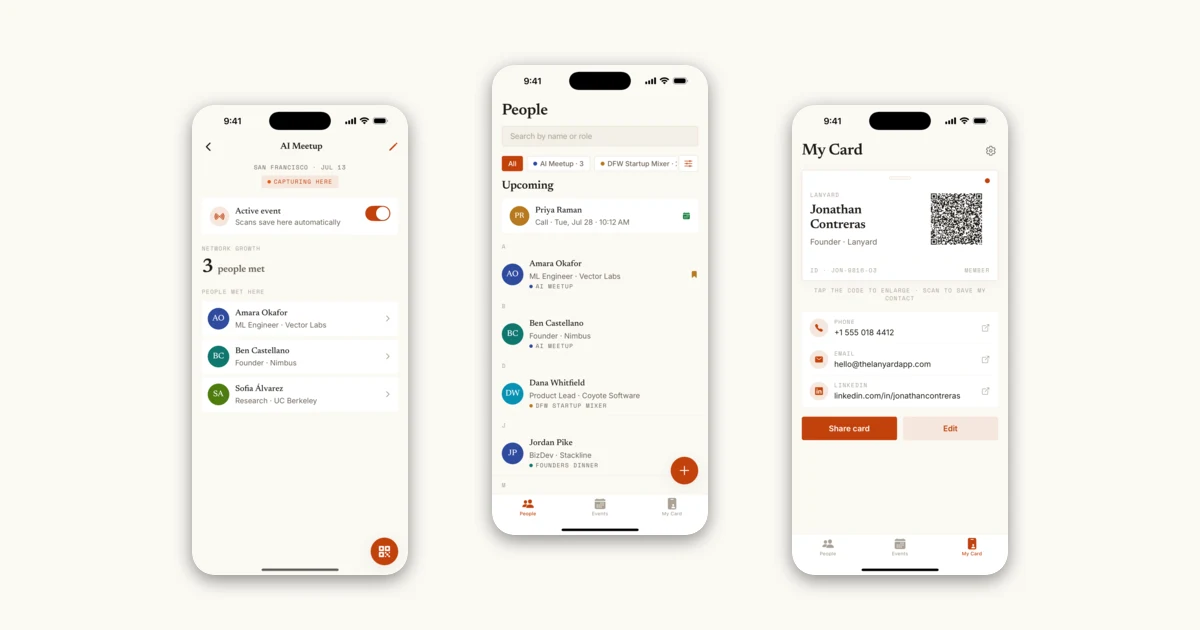
- What it is
- A native iOS app for the week after a conference, not the five seconds during it. It files each person under the event you met them at — the way memory actually indexes people — and keeps everything in on-device SQLite with no account and no backend.
- Hardest problem
- iOS Contacts silently ignores a vCard's FN property when the structured N property is absent, and falls back to ORG as the display name. Every contact Lanyard exported was landing in the recipient's phone under their employer's name. The fix synthesizes N from the display name, which means guessing which token is the family name — a guess the spec never asks you to make.
- What I'd change
- That guess is last-word-is-family, which is wrong for a large share of the world's names — Spanish two-surname conventions and most East Asian ordering among them. The honest fix is asking the user once, on their own card, and storing the split rather than re-deriving it.
- Days Solo To The App Store
- 23
- Network Requests Made By The App
- 0
- Tests
- 143
- Lines Of TypeScript
- 10,985
- Local Tables
- 3
- App Review Rejections
- 1
The Problem
Every app in this category optimizes the same five seconds: handing someone your details. Popl, Blinq, HiHello — tap a phone, fire a QR, done. That problem is solved, and it was never really the painful one. The painful one arrives three weeks later, when you are looking at a name in your phone with no idea who it belongs to. You met fifteen people at the conference and you can place two of them.
The reason a flat contact list fails here is that it throws away the only index a person actually remembers by. Nobody recalls a new acquaintance alphabetically. They recall "the ML engineer from the AI meetup" or "the VC from the founders dinner" — the event is the memory hook, and every tool in the space discards it at the moment of capture. So Lanyard makes the event the primary structure rather than a note field: contacts belong to an event, an event can be set active so anything scanned during it files itself automatically, and browsing is by where you were.
That framing forced a constraint that shaped the entire architecture: the other person must install nothing. A networking app whose value depends on the counterparty also having it is a networking app that fails at exactly the moment you need it — standing in front of a stranger who has never heard of it. Which rules out the obvious implementation, where both phones talk to a shared server, and leads to the design decision the rest of this case study is mostly about.
The second constraint was privacy, and it is not a marketing line here. The data this app holds is other people's personal information, collected in a social setting, by someone they just met. Uploading strangers' names, employers, phone numbers and my private notes about them to a server I operate would be a genuinely bad thing to do, and it is the default in this category. So: no account, no backend, no analytics SDK. Nothing in the app makes an HTTP request.
My Approach
The whole app is a local-first Expo application over on-device SQLite. Three tables — events, contacts, meetings — accessed through Drizzle with a thin repository layer, plus Zustand for the small amount of genuinely global UI state (the active event, onboarding status, theme). There is no sync engine and no server to sync to, which removes an entire category of problem: no auth, no conflict resolution, no offline mode, because there is no online mode to be offline from. The app works identically in airplane mode on a conference floor with no signal, which is the actual operating environment.
Capture has three paths, deliberately, because the constraint that the other person installs nothing means I cannot control what they hand me. If they also have Lanyard, scanning their QR is instant. If they have a paper business card, the camera OCRs it. If they have neither, the app shows a QR pointing at a static hosted page; they open it in their phone's browser, type their details, and it renders a vCard QR back that I scan with the normal scanner. That round-trip is the piece I am most pleased with: two devices exchange structured contact data with no account on either side and no server in the middle, because a QR code is a perfectly good transport for a kilobyte of text. The hosted page stores nothing and posts nothing — the data lives in their browser until they choose to show the code.
The card scanner is on-device OCR with a hand-written parser, and it is worth being precise about that because the tempting word is wrong. Google's ML Kit reads text off the photo; everything after that is regexes and heuristics I wrote — an email pattern, a phone pattern with enough digits, a role keyword list, a company-suffix list, a name-shape test, and a fallback that derives a company from an email domain while skipping generic mailbox hosts. No model interprets the card. The parser is deliberately forgiving and never throws, because it does not need to be right: it prefills a form the user immediately reviews and corrects. Human-in-the-loop is not a safety disclaimer bolted on afterwards, it is the reason the heuristics are allowed to be this cheap.
The reminder layer is the one place the app has to reason about time, and it is scoped as narrowly as possible. Recurring events carry a lightweight cadence anchored to their date — the anchor's weekday defines a weekly or biweekly pattern, and its ordinal week defines a monthly one, so "3rd Thursday" needs no extra fields. That drives exactly one thing: a local morning notification on the day an event recurs, nudging you to set it active. The app never writes to your calendar and never negotiates a meeting on your behalf.
What it looks like
Technical Deep Dive
The vCard N-field, which is the most interesting bug I hit. My Card renders a QR containing a vCard 3.0 payload, and early on the contacts it produced were landing in the recipient's iPhone under the wrong name — showing the company instead of the person. The payload had a perfectly good FN (formatted name) property, which RFC 2426 makes the required display name; N (the structured family/given breakdown) is not required and I had omitted it. iOS Contacts turns out to ignore FN entirely when N is absent, and falls back to ORG. So a spec-valid card imports as "Vector Labs" instead of "Amara Okafor." The fix is to always emit N, which means splitting a display name I only ever received as one string: the last whitespace-delimited token becomes the family name, everything before it the given name, and a single-token name goes in the given slot with an empty family field. That heuristic is the compromise — see the challenges below, because it is also the thing in this project I am least comfortable with.
Recurrence arithmetic, and why it runs on integers. Computing "the next occurrence on or after today" by subtracting two local Date timestamps and dividing by 86,400,000 is correct for most of the year and wrong twice, because a day containing a DST transition is 23 or 25 hours long and the division lands on the wrong side of the floor. Every date comparison here instead goes through a day index: Date.UTC(year, month, date) divided by a day in milliseconds, using the local calendar fields but UTC's fixed-length days. Two moments on the same calendar day always produce the same integer regardless of time of day or timezone politics, so the weekly and biweekly maths become plain integer stepping and the monthly case becomes a bounded search for the nth weekday, skipping months with no fifth occurrence. Small, but it is the kind of thing that produces a bug report six months later reading "the reminder came a day early, once."
Reminder reconciliation, which has to be idempotent because the OS forgets. A DATE-triggered local notification fires exactly once and is then gone, so a weekly event needs its next reminder re-armed after every occurrence — and there is no background job to do it, because the app has no server and I did not want a background task budget. Instead reconcileEventReminders takes the full event list and, for each one, either schedules the next reminder or cancels any existing one, driven by whether the event is still recurring, still has reminders enabled, and whether notification permission is still granted. It is safe to call on every app start and every Events-tab focus, which is exactly what happens. Two details make that work: each notification is scheduled with a deterministic identifier so re-scheduling overwrites rather than duplicates, and event reminders are namespaced as event-reminder-<id> while meeting reminders use the bare meeting id, so the two kinds can never collide on a shared key. Failures are swallowed per-event so one bad schedule cannot abort the rest of the sweep.
A related subtlety in the same file: the reminder time is 8am on the occurrence day, so a reconcile that runs at noon on the day of an event would compute a fire time already in the past. Rather than schedule nothing, nextReminderFireDate advances to the following occurrence — so opening the app on club day at lunchtime arms next week's nudge instead of silently dropping it. Anything computed in the past is treated as a cancel, which also cleans up a reminder left over from a meeting that was moved earlier.
Shipping, which was its own engineering problem. Build 15 of 1.0 was rejected under App Store guideline 5.1.1(iv). The camera pre-permission screens — the explanatory panel shown before the OS prompt — used a button labelled "Enable camera," and Apple's position is that pre-prompt wording must not direct the user toward granting access; the guideline wants neutral wording like "Continue." The explanatory copy and the denied-state "Open Settings" path already complied, so the remediation was two button labels. It is a two-line diff with a real lesson in it: the pre-permission pattern is standard advice, and the part everyone gets wrong is that the button is part of the consent flow, not part of the marketing. 1.0.1 went through.
What holds it together is that the interesting logic is pure. vCard encoding, the business-card parser, recurrence maths, contact matching, formatters, the intake round-trip — none of them touch the database, the camera, or the network, so all of them are unit-testable without a device. The native modules that cannot be tested (expo-notifications, contacts import) are imported lazily inside the functions that need them, specifically so the pure suites stay runnable under Jest. That is why the test count is where it is on a 23-day solo project: the tests were cheap to write because the code was arranged so they could be.
Challenges & Lessons
A spec-valid vCard imported under the wrong name. FN is the required display-name property and N is optional, so omitting N is correct by the letter of RFC 2426 — and produces contacts labelled with the company on every iPhone. The lesson is the boring one that keeps being true: conformance and interoperability are different goals, and the platform's actual behavior beats the document when they disagree. The uncomfortable part is the fix. Synthesizing N means deciding which token is the surname, and last-word-is-family is an Anglophone assumption that gets Spanish two-surname names and most East Asian ordering wrong. I shipped it because a wrong name split still displays the right full name, whereas no N displays the company — so the failure mode is strictly better than the one it replaced. But it is a guess the app makes about people's names without asking. Next: collect given and family as separate fields on the user's own card during onboarding, store the split instead of re-deriving it, and keep the heuristic only for OCR'd cards where there genuinely is no better information.
Day arithmetic across a DST boundary. The first version of the recurrence code subtracted local Date values to count days, which is off by an hour twice a year and therefore off by a whole day whenever that hour crosses midnight. Routing every comparison through a UTC-derived integer day index fixed it. Lesson: for calendar questions, stop working in instants as soon as possible and start working in day numbers — the moment you are asking "is this the same day" rather than "how much time elapsed," milliseconds are the wrong unit and will eventually lie to you. Next: the same treatment for the meeting-reminder lead time, which is still computed as a millisecond offset and would drift by an hour for a meeting scheduled across a transition.
One-shot notification triggers versus recurring events. A DATE trigger fires once, so "weekly event" and "weekly reminder" are not the same object, and with no backend there is nothing to re-arm the next one on a schedule. Making the reconcile a full sweep — schedule-or-cancel every event, every time, keyed on a deterministic identifier — turned a stateful problem into a stateless one that is correct no matter how often or how rarely it runs. Lesson: when you cannot guarantee how often a sync runs, make it idempotent and run it on every plausible trigger; that is cheaper than being clever about when to run it. Next: reconcile on notification-permission changes too, since revoking and re-granting in Settings currently leaves reminders un-armed until the next Events-tab visit.
App Review rejected the wording on a permission screen. Guideline 5.1.1(iv) treats a pre-permission button labelled "Enable camera" as steering the user toward consent. Lesson: the compliance surface of a mobile app is larger than its code and includes copy you would never think of as load-bearing — and the pre-permission pattern that every tutorial recommends has a specific way of being done wrong. Next: audit the contacts and notifications pre-prompts against the same standard before the next submission rather than after it.
A debug screen shipped to production, and the reason was structural. app/dev/database.tsx loads seed data, loads a 600-contact performance fixture, and wipes the database — and it went out in 1.0.1, reachable via lanyard://dev/database?seed=1. I had assumed that declaring a screen in the root layout was what made it routable, so leaving the declaration in looked cosmetic. Expo Router derives routes from the filesystem: the declaration only sets the title, and the file being in app/ is what makes it reachable. The guard now lives in the screen component, which is the only place that can actually close a deep link. Lesson: with convention-over-configuration routing, ask what makes a route exist rather than what makes it appear — and treat "is this reachable in release" as a thing to verify on a release build, not infer from source. Next: a submission checklist item that greps for dev routes and unguarded seed paths, because I will not remember this unprompted in six months.
More of the same kind of work
Eight projects, four with a model in the loop.